
Just a quicky; When creating a tunnel on he.net's tunnelbroker, you'll be given details as following:
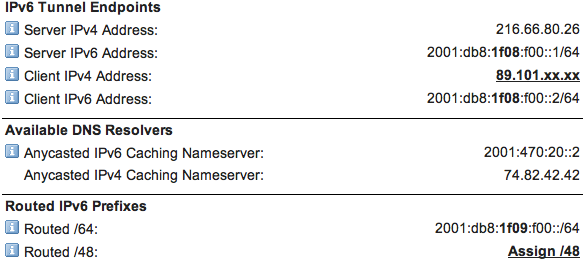
In this case, 2001:db8:1f09:f00::1/64 is your routed /64. Notice that the portions of the address that are in bold, are not the same for your prefix, and your endpoint addresses.
- 2001:db8:1f08:f00 is going to be your endpoint,
- 2001:db8:1f09:f00 is going to be your prefix.
So now we open Airport Utility, and in Advanced->IPv6, it all becomes straight-forward. Set the mode to Tunnel. Until you've come to terms with the implications of having a public routed address to every host, it's probably safer to check Block incoming connections. And then fill in the blanks - Your WAN address is endpoint::2, and your route is endpoint endpoint::1. Your LAN address is simply your prefix.

Take a quick detour into Internet->TCP/IP to add the nameserver (2001:470:20::2) in the first screenshot into the field labelled 'IPv6 DNS Server(s)', and then hit Update.
Sorted.